
FAQ
The Answers You Need
Is Lezel available in my state?
Currently, Lezel is operational in several counties in California State. With increasing popular demand, Lezel will become available in more states where recreational cannabis is lawfully purchased and consumed.
How can I download the Lezel app?
Lezel is available for download on both Apple and Android devices. Click below to start your download.
How can I sign up for a Lezel account?
Visit our homepage at www.lezel.co to apply for your membership account.
Who is eligible for Lezel membership?
Applicants over the age of 21 who reside in a US location where recreational cannabis can lawfully be purchased are guided thru a profile questionnaire to determine if our services fully support the personal goals required by the individual applicant.
Privacy - who has access to my information?
Please review our Privacy Policy to understand how your data is collected, used, and managed.
Can I access my account from a browser?
Yes, Lezel hosts a web-based app accessible from most devices and on most platforms. To gain access to our web app, please leave us a message in the contact section of this page.
What are the benefits of session reporting?
Each session is factored into robust algorithms to define your very own requirements better. Our artificial intelligence is then better able to provide more accurate solutions to your needs based on your profile, requirements, conditions, satisfaction responses, and other factors you contribute to enhancing your consumption persona.
How can I report a session?
Getting started is super easy! Go to app>main menu>New Session to begin logging your experiences.
My activity doesn't appear on the screen, what should I select?
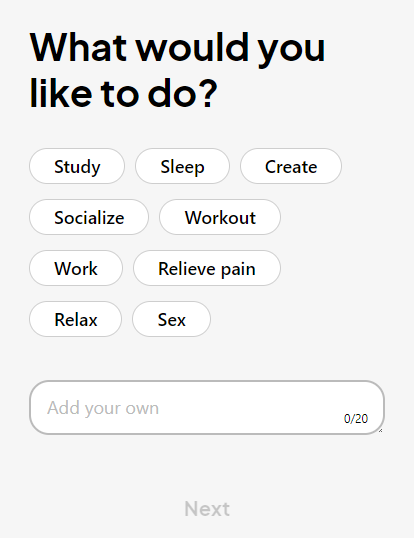
Below the default activities, you'll find a designated input field to "Add your own" activity. We recommend using the infinitive form rather than a gerund, as the language throughout the app flows seamlessly in this format. Once added, your activity will be stored on your menu so you can quickly select it in future sessions. Check back as we will extend the default activities with useful additions added by a large number of user accounts.
How do I describe what I'm feeling?
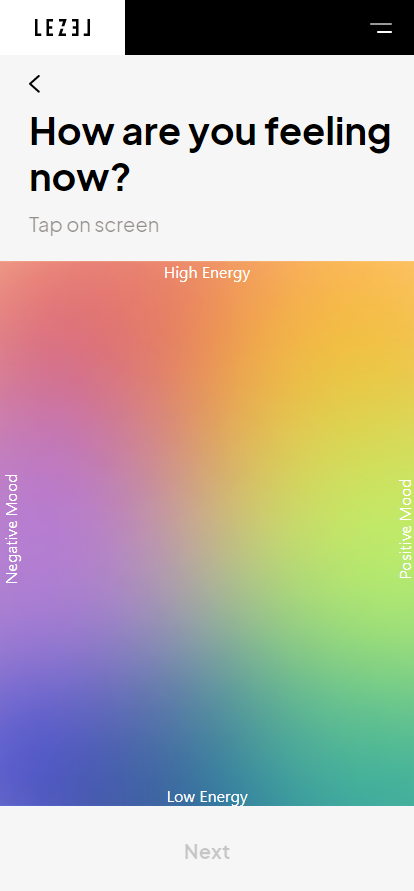
When prompted with the question "How are you feeling now?" we provide you with a comprehensive yet cutting-edge rating system. Developed by The Yale Center for Emotional Intelligence, this 2-dimensional chart helps you express your current mood by rating two factors:
Rate your energy on the ↕ y-axis (up and down). The bottom edge represents zero energy level, and the top represents the most energetic you remember feeling.
Rate how positively you're feeling on the ↔ x-axis (left to right), with the leftmost edge representing the most unpleasant state of mind while the rightmost edge represents the most pleasant feeling you can think of.
In this system, you can find the "ecstatic" feeling at (10,10), the upper right corner, with the opposite being "despairing" located at (1,1), the lower left corner.
Do I need to be accurate in my mood ratings?

Rating your feelings is simple and easy. Once you have roughly estimated your energy level on the ↕ y-axis (up and down) and your positivity level on the ↔ x-axis (left to right), you can click in the relevant graph area where a named feeling will appear. Next to each feeling, 'nearby' feelings will help you refine and confidently choose your current mood; click the one most accurately describes your present feeling.
Which vape should I use to create the feeling I want?
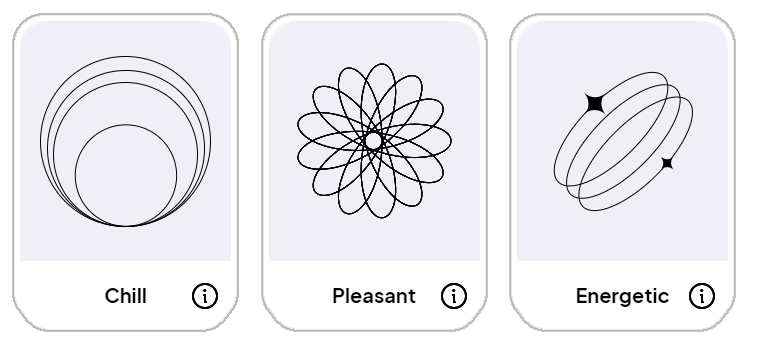
After selecting your current mood, you'll be prompted to choose how you'd like to feel to best perform your current task. Click one of the available choices and find the matching vape with the identical color, logo, and name.
Something is wrong, I'd like to report a bug
We are always ready to help and improve your interactions with our app. Please leave us a message here to notify us of any technical issues or bugs.